Sell Canva Templates Beginners Guide
A beginner's guide to sell Canva templates, create digital products, generate template links, and start selling online.


Sell Canva Templates: A Beginner's Guide to Starting on Etsy
If you're thinking about selling Canva templates but feel overwhelmed by where to start, you're not alone.
One of the biggest mistakes I see beginners make is jumping straight into Canva and designing random templates without understanding what actually sells, how template links work, or how customers receive their purchases.
I've been selling Canva templates and digital products online for years, and in this guide, I'm going to walk you through the foundations you need to understand before creating your first template.
By the end, you'll know what types of Canva templates you can sell, the important rules you need to follow, and how to turn your Canva designs into editable templates that customers can instantly access after purchase.
If you prefer to watch the video, click here ➡️
Sell Canva Templates by Understanding What Canva Templates Actually Are
Before you sell Canva templates, it's important to understand exactly what you're selling.
A Canva template is a pre-designed graphic, document, planner, invitation, or marketing asset that another person can edit inside Canva.
Instead of creating something from scratch, your customer simply opens the template, updates the text, changes colours, swaps images if needed, and customises it for their own use.
This is one reason Canva templates have become such a popular digital product.
Customers save time.
Businesses get professional-looking designs faster.
Creators get access to ready-made designs without needing graphic design skills.
Sell Canva Templates in Popular Etsy Niches
One of the best things about selling Canva templates is that there are countless niches you can create products for.
Some of the most popular Canva templates on Etsy include:
Social media post templates
Pinterest pin templates
Vertical video templates
Business planners
Workbooks
Ebook templates
Wedding invitations
Baby shower invitations
Party decorations
Restaurant menus
Business flyers
Price lists
Marketing graphics
Personally, I've sold social media templates, reel templates, invitations, ebook templates, and email templates.
The beauty of a Canva template business is that once you've created the design, you can continue selling it repeatedly.
You create it once.
Upload it to Etsy.
Customers purchase it instantly.
Then the process repeats.
This is why digital products on Etsy appeal to so many creators.
Sell Canva Templates Without Breaking Canva's Rules
Before you sell Canva templates, there are a few important Canva rules you need to understand.
One of the biggest areas beginners get confused about is Canva's element library.
Inside Canva you'll find thousands of photos, graphics, illustrations, icons, and design elements.
Some are free.
Others are Pro elements (crown icon).
When creating editable Canva templates, you need to understand what happens when customers open those designs.
If your template contains Canva Pro elements, your customer will need Canva Pro access to use those specific elements.
My recommendation is to always use only free elements, or images and graphics you own that can be shared.
It's also worth opening your designs in preview mode and checking exactly what your customer experience looks like.
A good customer experience helps reduce confusion and support requests later.
Sell Canva Templates Faster With Ready-Made Starting Points
Here's a little truth that many beginners need to hear.
You do not need to create everything from a blank page.
Many new sellers spend weeks trying to design every product themselves before launching anything.
Sometimes that perfectionism becomes the thing that keeps them stuck.
If your goal is simply to get moving faster, using Done For You templates as a starting point can save a huge amount of time.
That's exactly why I created the Digital CEO Bundle.
The bundle includes a large library of Done For You Canva templates that you can customise, adapt to your niche, and turn into your own digital products.
Inside you'll find planners, invitations, social media templates, workbook templates, marketing graphics, Etsy mockups, digital planners, journals, and more.
Rather than staring at a blank Canva page wondering what to create, you can start with a proven structure and customise it to suit your audience. 👉🏼 You can check out the Digital CEO Bundle HERE.
Creating an Editable Canva Template Link
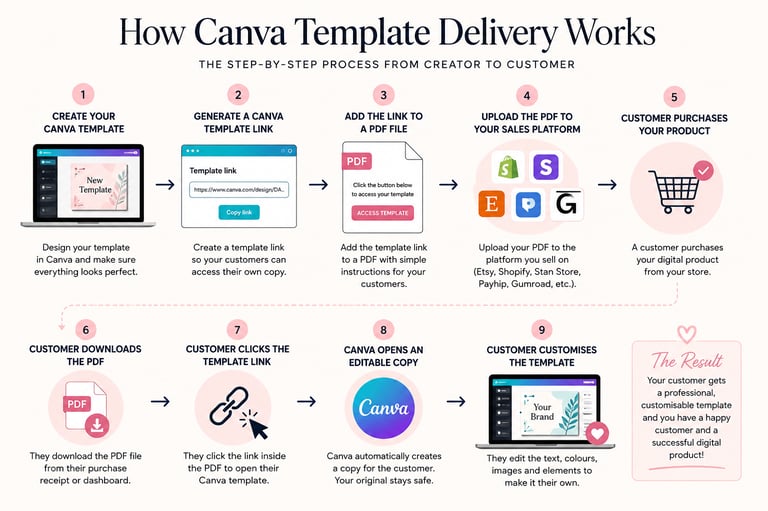
Once your design is complete, the next step is creating an editable Canva template link.
This is what allows your customer to receive their own copy of the design.
Inside Canva, you'll generate a template link from your completed design.
When a customer clicks this link, Canva automatically creates a copy for them.
Your original file stays protected.
Their copy becomes editable.
This is exactly what you want when selling Canva templates on Etsy.
Never share your original master design with your customers.
Sell Canva Templates Using a PDF Delivery File
One question I hear all the time is:
"How do customers actually receive the template?"
This is where a PDF delivery file comes in.
Etsy requires sellers to upload a downloadable file.
Instead of uploading the Canva template itself, you upload a PDF that contains the Canva template link.
The process is simple.
The customer purchases your listing.
They download the PDF.
They click the button or access link inside the PDF.
The link opens Canva.
They gain access to their editable template.
Customers download the PDF, click the link, and access the template.
That's the entire delivery process.
If you're looking for ideas for beginner-friendly digital products before creating your first template, you can download my free resource, Digital Product Ideas for Beginners (In the AI Era), which shares product ideas that work well in today's digital marketplace. You can check it out HERE.
Uploading Your Files to Etsy
After creating your PDF delivery file, it's time to upload it to Etsy.
Inside Etsy, go to Shop Manager.
Click Listings.
Select Add a New Listing.
Once you've completed your listing details, you'll reach the file upload section.
This is where you'll upload the PDF containing your Canva template link.
When a customer purchases your listing, Etsy automatically delivers that PDF to them.
From there, they click the link and access their editable Canva template.
It's a simple process, but understanding this workflow is essential before you start listing digital downloads on Etsy.
Sell Canva Templates Successfully as a Beginner
If you're brand new to Etsy, don't overcomplicate this.
Many beginners spend too much time researching and not enough time launching.
The goal isn't to create the perfect template.
The goal is to create a useful template and get it in front of customers.
Start simple.
Choose a niche.
Create a template that solves a problem.
Generate your Canva template link.
Create your PDF delivery file.
Upload it to Etsy.
Then improve as you go.
Action creates clarity.
Waiting for perfection creates more waiting.
Stop Waiting For Everything To Be Perfect
When I first started selling Canva templates, I wasn't working full-time on my business.
I was at home looking after my baby.
Most of my work happened during nap times, early mornings, and in small pockets of time throughout the day.
That's why I'm such a big believer in simple digital products.
I didn't have hours every day to spend creating complicated offers.
I needed products that could be created once and sold repeatedly.
Over time, those small pockets of work added up and my digital products began generating consistent four-figure months while I was still working around family life.
Not because I worked around the clock or had a huge audience.
But because I focused on creating useful products and publishing them consistently.
If you're waiting until you have more time, more skills, or the perfect plan, this is your reminder that you don't need any of those things to get started.
The biggest progress in my business came from launching imperfectly and improving as I went.
Final Thoughts
Selling Canva templates is one of the simplest ways to get started with digital products because you're creating resources that save people time and help them achieve a result faster.
The most important thing is not getting stuck in endless planning.
Choose a niche.
Create a useful template.
Learn how template links work.
Set up your delivery PDF.
Then launch your first listing.
You can improve everything later, but you can't improve something you never publish.